Concerning Emacs (and Jazz)
Fri May 22 20:11:45 2026
Intro
I have been preaching about Emacs for about two years now, ever since I started using it. It is by far my top used program on my PC. I have been to meetups about it, I write emails about it, I read books and articles on it, I share my dotfiles with others who are interested in setting a package up like I do. At this point, I am too dependant on Emacs to not write an article about it.
Emacs is my main program. When I boot my computer, Emacs is almost always the first program I open. When I shut down my PC, it’s almost always the last program I kill. In this article, I want to tell you how it came to be, what I like and dislike about it, and I will try to convince you to try Emacs.
Text editors and creativity
I have a Diplom1 in Jazz Guitar. One of the reasons for making such a questionable decision was the fact that I needed an artistic outlet. I have always been fascinated by music, and ever since I remember I wanted to make music. Now I wasn’t any good at it till I started studying it seriously, but it was through Jazz that I was able to express myself freely in a (quite literally) formal2 context.
This is something that I think defines me as a person. I don’t usually look for the easiest way, or the hardest way of doing things. I seek to do things in a way where I can express myself, in a way where I can be uniquely me. I find that satisfying: all humans are unique. There should not be one tool beyond the most basic simple tools that are perfect for ’everyone’. Whenever there is talk of such a thing, there is talk of compromise. Yes, I am not going to get artisanal screwdrivers that are perfect for the shape of my hands and are carved from the exotic woods of the branches of a binary tree, because that is expensive, cumbersome, and I don’t use screwdrivers 24/7 to justify such a purchase.
But do you know what I work with every day? Computers. You probably knew, but most people don’t know that customizing computers is a very easy task, if you have the right framework. I don’t need a riced setup where every window animates and phases in an out of existence. I run a bare and minimal i3 setup. It is highly functional, I am extremely fast and comfortable with it, I don’t need to think about what I am doing, and it is perfectly and completely personalized for me. I feel like I have mastered navigating my computer, just as learning Jazz guitar taught me how to master my instrument3.


I felt creative when I was setting up my environment. The idea was to see what my hands wanted to do when my brain wanted to do a task, for instance switching to the next workspace, and then just configure i3 to do that which my hands want to do by default. That’s really easy, it turns out I have strong preferences on how I want my shortcuts to work (especially considering my preference for the 34 key keyboards, but that’s a subject for a different time). Sometimes there is a little problem solving required, but nothing that a couple of nights of hacking won’t fix. That may sound like much, but it is a creative endeavor which (for me at least) is a lot of fun, because I get to tackle problems till I can achieve perfection. This is much easier to do with computers than is in music for instance. Maybe I need this program to open up on the right side of my chats workspace on launch, maybe I need my Weechat IRC session that tmuxes into my server to have a different terminal config. A little bit of creative work here and there, and in the end you have something that you can truly identify with and is uniquely yours.
Emacs enables me to take this approach and apply it to almost all of daily computing, but we are not talking only about customization. Emacs (and in my experience, evil-mode4) allow me to think about my text as music, with the instrument being not a guitar, but my trusty Ferris Sweep. Using Vim motions in this enormously powerful Elisp interpreter feels like magic. Now it’s not only about editing text, it’s about how I can do it being truly myself; how I can manipulate these letters that I see on the screen just in the same way I improvise in music.
Do I need to surround this integer in brackets, then add commas after every digit? Do I need to copy something from the inside of a quotation mark 20 lines up, and then paste it instead of every occurrence of the word occurrence? Or perhaps rename my files the same way I send my Emails? Of course those who use Emacs think that this is borderline too easy (except the last one), but I am not sure if is truly easy in the text editors that “normal”, “non-nerdy” people use5. The point is also not that these tasks are possible (or impossible) in other environments in the first place, the point is that there is a sense of creativity that flows into these tasks. For these two simple tasks (…and a weird one), I can think of at least three different solutions for each problem. The one I choose could depend on my mood, the day of the week, the weather in Alaska or the planetary alignment of Venus and Mars.
I get to choose, and I have a choice of doing it using method A or method B6. Ignoring the quantity of approaches where one can achieve a goal, some of these approaches require problem solving and the ability to think ahead. It’s just nice having your brain tickled when you are doing mundane tasks. I think it keeps me sharp. It’s not about doing things necessarily in the easiest way because of course using a mouse would be easier, but it’s also no fun at all, and doesn’t elicit any sense of joy in me.7
Some examples
- Taking the example from earlier, let’s say I want to convert
12345into[1, 2, 3, 4, 5], and my pointer starts on the 1. I have to think how I could set up a macro that works well once for every other iteration it should be at the correct point:q q a , SPC ESC l q, and then3Qto execute thrice. Create a macro, bind it to q, insert a comma, move to right once, end recording macro. Let’s say I have a table with two formulas which does grading for a test, given the following table formulas directly after the table:
Vorname Nachname Test 1 Test 1 Max Test 1 Total Test 1 Note 15 J.S. Bach 12 80 2+ Kurt Gödel 8 53 4+ M.C. Escher 13 86 1-
#+TBLFM: $5=trunc(($3/@2$4)*100)
#+TBLFM: $6='(cond ((>= $5 95) "1+") ((>= $5 90) "1") ((>= $5 85) "1-") \
((>= $5 80) "2+") ((>= $5 75) "2") ((>= $5 70) "2-") \
((>= $5 65) "3+") ((>= $5 60) "3") ((>= $5 55) "3-") \
((>= $5 50) "4+") ((>= $5 45) "4") ((>= $5 40) "4-") \
((>= $5 33) "5+") ((>= $5 27) "5") ((>= $5 20) "5-") \
(t "6"));L
I want to type in a grade in $3 and have the grade be evaluated in $6. My workflow after typing a grade is to create a macro: q q m a 7 G C-c C-c j C-c C-c ' a k TAB TAB TAB w8, and for all further grades I can just do Q. In the end, all I have to do is to do a task once and prepare it for further iterations with a proper starting point. Create a macro, bind it to q, set a mark and record it to a, go to line 7, run the table formula, move down, run the table formula, go back to mark, go back to the correct cell.
- I am working through some elixir Koans, and they are formatted as such:
defmodule Numbers do
    @moduledoc false
    require Integer
    use Koans

    koan "Is an integer equal to its float equivalent?" do
    assert 1 == 1.0 == ___
    end

    koan "Is an integer threequal to its float equivalent?" do
    assert 1 === 1.0 == ___
    end

    koan "Revisit division with threequal" do
    assert 2 / 2 === ___
    end
end
The placeholders are ___ and I would like to work them one by one: / ___ RET C $answer ESC n C $answer ESC n C $answer and so on9. Search for _, go to first occurence, delete it and put me in insert mode, exit insert mode, search for next occurence and so on.
I don’t think there are any two Emacs users that work in the same way: I can’t believe it. There are for sure as many ways for accomplishing the same task in Emacs as there are ways to enclose a target note in chromatic enclosures when you are improvising on bebop. The fact that I get to choose and see which workflow I like best is something that I can’t do in any given environment, but in Emacs I feel like every time I create an approach, I learn about another, sometimes cooler way of doing the same thing. And I think that’s beautiful.
Keybindings that carry over
Of course, that’s a lot of keybindings! But the good news is, no matter what kind of environment I find myself in, whether it’s browsing the news, writing emails, taking notes, programming and so on, I can rely on the same set of keybinds to carry me through my day. This in turn improves my connection with my computer and makes it so that my computer truly is perceived as an extension to myself just as my instrument is. I don’t need to think about what I am doing or how I want to do it (unless I want to), I just do it10. I could (and will) compare this to the placement of notes on any given instrument. No matter what genre you play, or whose music you play, the fingerings/positions/lip tensions for the notes stay the same11.
There is a package for that
Do you remember Apple’s “there is an app for that”?12 There are tons of packages that have been created for Emacs in the past 30 years. Because Emacs is technically only an Elisp interpreter, it is a great, self-documenting IDE that interprets programs that it itself runs. It’s beautiful! Here are some packages I use daily:
magit
Perhaps the greatest git porcelain ever developed. I haven’t tried many, but I don’t think there’s a way of beating this. It is very ergonomic and intuitive to work with. No qualms whatsoever. I use git daily for private repos. It’s mostly my dotfiles, and backups of some important text files, and sometimes I develop projects that are of course version controlled. Magit makes it so easy to see and work with your diffs, stages, commits, stashes, pops, squashes, tennis, ping-pong, whatever. The keybinds are single letters (for instance, p brings you to push menu, and pressing p again pushes to your preferred remote). You can view your logs effortlessly, see merge trees, have it wash the dishes13. I probably use about ~10% of the functionality that magit offers, and I can still wholly recommend it.
mu4e
By far my most preferred mail client. I tried notmuch and did not really like it much. mu4e needs a bit more setup on my side, but in the end it works better than any mail client I have used. Here’s my mu4e config14:
(add-to-list 'load-path "/usr/share/emacs/site-lisp/mu4e")
(require 'mu4e)

(setq org-msg-mode nil)

(setq
     mu4e-get-mail-command "mbsync -a"
     mu4e-update-interval 300
     mu4e-index-update-in-background t)


(setq mu4e-context-policy 'pick-first
     mu4e-compose-context-policy 'ask)

(setq
     sendmail-program "/usr/bin/msmtp"
     mail-specify-envelope-from t
     message-sendmail-envelope-from 'header
     mail-envelope-from 'header)

(setq message-send-mail-function 'message-send-mail-with-sendmail)

(setq mu4e-sent-messages-behavior 'sent)
(setq message-kill-buffer-on-exit t)
(add-hook 'mu4e-compose-mode-hook #'(lambda () (auto-save-mode -1)))

(setq mu4e-attachments-dir "~/Downloads")

;; color scheme
(require 'mu4e-contrib)
(setq mu4e-html2text-command 'mu4e-shr2text)
(setq shr-color-visible-luminance-min 60)
(setq shr-color-visible-distance-min 5)
(setq shr-use-colors nil)
(advice-add #'shr-colorize-region :around (defun shr-no-colourise-region (&rest ignore)))

(setq mu4e-contexts
     `(,(make-mu4e-context
         :name "Fastmail"
         :match-func (lambda (msg)
                       (when msg
                         (string-prefix-p "/Fastmail" (mu4e-message-field msg :maildir))))
         :vars '((user-mail-address . "personal@email.tld")
                 (user-full-name . "Omid Mashregh-Zamini")
                 (mu4e-drafts-folder . "/Fastmail/Drafts")
                 (mu4e-sent-folder . "/Fastmail/Sent")
                 (mu4e-trash-folder . "/Fastmail/Trash")
                 (mu4e-refile-folder . "/Fastmail/Archive")))
       ,(make-mu4e-context
         :name "IServ"
         :match-func (lambda (msg)
                       (when msg
                         (string-prefix-p "/IServ" (mu4e-message-field msg :maildir))))
         :vars '((user-mail-address . "work@email.tld")
                 (user-full-name . "Omid Mashregh-Zamini")
                 (mu4e-drafts-folder . "/IServ/Drafts")
                 (mu4e-sent-folder . "/IServ/Sent")
                 (mu4e-trash-folder . "/IServ/Trash")
                 (mu4e-refile-folder . "/IServ/Archive")))))

(setq mu4e-bookmarks
      ;; This should be improved. I hacked it till it worked, without reading the docs.
     '((:name "All" :query "(maildir:/Fastmail/Inbox OR maildir:/IServ/Inbox OR maildir:/Fastmail/Gmail) AND NOT (maildir:/Fastmail/Junk OR maildir:/IServ/Junk OR maildir:/Fastmail/Trash OR maildir:/IServ/Trash) AND NOT flag:trashed" :key ?a)
       (:name "Flagged" :query "flag:flagged" :key ?!)
       (:name "Gmail" :query "maildir:/Fastmail/Gmail" :key ?g)
       (:name "Fastmail" :query "maildir:/Fastmail/Inbox" :key ?f)
       (:name "IServ" :query "maildir:/IServ/Inbox" :key ?i)
       (:name "Paypal" :query "maildir:/Fastmail/Paypal" :key ?p)
       (:name "Drafts" :query "maildir:/Fastmail/Drafts OR maildir:/IServ/Drafts" :key ?d)
       (:name "Unread" :query "flag:unread AND NOT flag:trashed AND NOT maildir:/Fastmail/Junk AND NOT maildir:/IServ/Junk" :key ?u)
       (:name "Today" :query "date:today..now" :key ?t)
       (:name "Week" :query "date:7d..now" :key ?w)
       (:name "Sent" :query "(maildir:/Fastmail/Sent OR maildir:/IServ/Sent)" :key ?s)
       (:name "Month" :query "(maildir:/IServ/Inbox AND date:31d..now)" :key ?m)))

(setq mu4e-headers-fields
     '((:human-date . 10)
       (:flags . 6)
       (:from-or-to . 22)
       (:maildir . 18)
       (:thread-subject)))

(setq org-msg-default-alternatives ; yes, I like HTML formatting in emails.
      '((new           . (utf-8 html))
        (reply-to-text . (utf-8 html))
        (reply-to-html . (utf-8 html))))
This config enables me to open my mailbox (and then it refreshes every 5 minutes), and go into any of my bookmarks with two keystrokes (b a for all mail except spam for instance). I can view my mail, and I can reply and compose in org-mode using org-mode syntax which converts automatically into a nicely formatted HTML-email15 which is then sent using msmtp, or I can add Emails to my TODO list which synchronizes with all my devices. It was a bit of a pain to setup and took me the longest of all these packages, but once it’s set up, it is unbreakable, reproducible and great across 3 PCs.
yas-snippets
As the Doom config file says: little elves that do the mundane tasks for you. I love these snippets and use them daily. They are reachable via SPC i s for me, and are based on the mode and type of file I am in. So I have my #+BEGIN_SRC, current time and what not in org mode, and I have my functions, flow operators and what not when I am programming. Due to the nature of my job as a teacher16, I experiment with a lot of new languages, and it’s great to have the snippets premade for me in Doom Emacs so I can focus on the logic and the language’s features, and less on the syntax.
elfeed
An RSS reader with a literate, org-mode source for all my feeds. I have a keybind set up to open a new workspace with elfeed in it (SPC o e), which I can close with q. I update my feed with SPC e u, and open the posts in my default browser17 with g o. Simple and elegant.
doom’s evil-mode
I can’t get used to default Emacs keybinds. It’s a project that I will tackle at some point, but I also didn’t know much Vim before I started using doom Emacs. In short, I find evil’s keybinds and motions to be very efficient, and it extends on the functionality of Emacs with intuitive keybindings. One of my favorites is S for surround. Running S <bracket> surrounds the region in whatever type of bracket you want.
doom’s workspaces
Basically like tabs in other editors, but more powerful. I like having different workspaces for different things. Calendar is in one tab, news in another, E-mail in another, my project in one, and whatever else I am doing in another. I use s-TAB akin to Alt-Tab to switch between workspaces. By default, mu4e opens in a new workspace in Doom. I have written a function for elfeed to work in the same way.
doom’s implementation of corfu
My coding autocomplete background using various LSPs. I don’t know much about how it works. It just works out of the box in Doom and I am happy to be able to code just like any other commercial IDE in Emacs.
org-mode
This is the big one. Those who know org-mode, know it and probably don’t use anything else for note taking, but for the uninitiated, let me please explain.
Org-mode is a major mode in Emacs18 originally written by Carsten Dominik, a professor of Astronomy at the Anton Pannekoek Institute for Astronomy which is part of the Faculty for Natural Sciences of the University of Amsterdam19, to organize his own life and work. Org-mode enables working with plain text in a brilliant way, where you can format your text (and using doom’s +org-pretty-mode, see those changes in your buffer) in the wildest ways, make TODOs, organize your calendar, have a hierarchy of outlines, expand and hide elements, work with tables, and much, MUCH more. You can even insert and execute code.
Literate coding wih Org Babel
That’s the part it get’s interesting. Imagine Jupyter Notebooks, but you can take ANY language and evaluate it, and pipe it’s output to the input of ANY language that you want, as many times as you want. All whilst having syntax highlighting and what not.
Some examples, starting with Python to Bash:
def add2(n):
    return n + 2
return add2(n)
7
echo "This should be seven: $input"
This should be seven: 7
Another example, tangling Haskell into C:
l = [1, 3..84]
answer = length l
answer
42
#include <stdio.h>
printf("%d is the asterisk's ASCII code.", answer);
42 is the asterisk's ASCII code.
Yes, that was C compiled and ran in org-mode using org-babel.
As an educator, this is priceless. Writing literate programs, using multiple languages, running them in place (even if they’re compiled!) and tangling them? …and I can make a website out of it?! or a presentation?? With two commands??
Before we move on, let’s try a wild thing:
\version "2.19.21"
#(ly:set-option 'backend 'cairo)
#(ly:set-option 'crop #t)
#(ly:set-option 'midi-extension "mid")
\include "predefined-guitar-fretboards.ly"

#(set-global-staff-size 24)

global = {
  \time 4/4
  \tempo 4=120
  \key c \major
  \partial 4
  \numericTimeSignature
}

melody = \relative {
  \global
  g'16 a c a
  e'8. e16~  e8 d
  r4 g,16 a c a
  d8. d16~ d8 c
  r4
  g16 a c a
  c4 d8 b~
  b16 a g8~
  g g
  d'4 c2 r4

}

bass= \relative {
  \global
  \clef bass
  r4 f,8. f16~ f8 g8 r2
  e8. e16~ e8 a8 r2
  f4. g8~ g4 r4
  e4  a2 r4

}

text = \lyricmode {
  Ne ver gon na give you up
  ne ver gon na let you down
  ne ver go na run a round - and de sert you
}

\score {
  <<
    \new Staff  {
      \context Voice = "vocal" { \melody }
    }
    \new Lyrics \lyricsto "vocal" \text
    \new Staff  {
      \bass
    }
  >>
  \midi{}
}
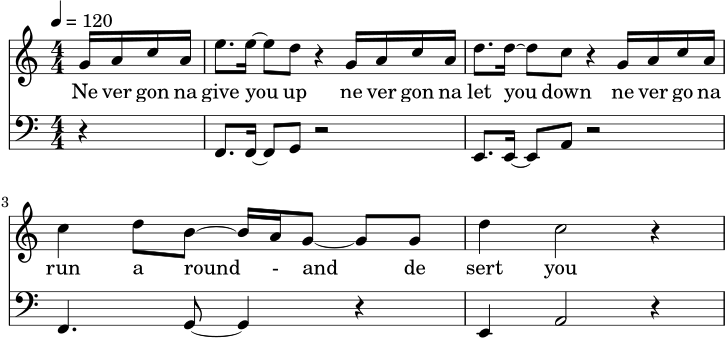
Figure 1: Leadsheet example using GNU LilyPond. Enable JS for MIDI playback.
Sorry, but you really didn’t expect that, did you? 😎
org-dispatch
This is where a lot of the export magic happens. Pressing SPC m e opens the org-dispatch minibuffer from which I can press h o to create an HTML file, or h h to create and open the HTML file. I also use org-re-reveal. That means I can press v v and turn it into a RevealJS presentation. org-dispatch is also how I write this blog. You can also inject your own HTML at top or bottom (just like I’ve done here) or include CSS (as you can see). There are also some setupfiles with which you can do other crazy things, like have a documentation page. I use one of these setupfiles for the Wiki which I use for teaching20. This includes some fancy JS so the students can click through. I type in most of the stuff live the first time I am going over a subject, and will push instantly using the following code snippet:
(defun my/publish-unterrichtsmaterial ()
  (interactive)
  (when my/is-desktop
    (let ((org-file "/mnt/NVME/NextCloud/Emacs/roam/20260105114329-unterrichtsmaterial.org")
          (html-file "/mnt/NVME/NextCloud/Emacs/roam/20260105114329-unterrichtsmaterial.html"))
      (with-current-buffer (find-file-noselect org-file)
        (org-html-export-to-html))
      (shell-command
       ;; I mount my webserver using sshfs.
       (format "scp %s matrix:/var/www/html/portfolio/unterricht.html" html-file))
      (message "Unterrichtsmaterial aktualisiert.")))

  (when (or my/is-laptop my/is-work)
    (let ((org-file "/home/omidmash/Nextcloud/Emacs/roam/20260105114329-unterrichtsmaterial.org")
          (html-file "/home/omidmash/Nextcloud/Emacs/roam/20260105114329-unterrichtsmaterial.html"))
      (with-current-buffer (find-file-noselect org-file)
        (org-html-export-to-html))
      (shell-command
       (format "scp %s matrix:/var/www/html/portfolio/unterricht.html" html-file))
      (message "Unterrichtsmaterial aktualisiert."))))

(map! :leader
      :desc "Update Unterrichtsmaterial" "p u" #'my/publish-unterrichtsmaterial)
There is even org-publish which should do just that (and more) but I haven’t gotten around setting it up yet. It’s high on my todo list. This blog is also (obviously) written and htmlized in Emacs.
I also use org-mode to write tests/quizzes for my classes. I then export everything using org-dispatch to LaTeX using a little bit of custom stuff such as places to write down the answers:
#+LATEX_HEADER: \newcommand{\ans}{\vspace{3.5cm}}
#+LATEX_HEADER: \newcommand{\shortans}{\vspace{2.7cm}}
1. Wofür steht die Abkürzung REPL?
   @@latex:\shortans@@
2. Nenne die vier elementaren Datentypen aus dem Unterricht und je ein Beispiel. @@latex:\pts{4}@@
   @@latex:\ans@@
org-dispatch also supports markdown and odt and I am sure there are lots of packages making it do all sorts of crazy things.
org-agenda and calfw
Org-mode can also do excellent TODOs. There is a video with Distrotube who does a better job than me at explaining this. I use this extensively to manage my day-to-day activities, and to set deadlines and schedules. I use the beorg app on my iPhone to sync all of this with my phone’s calendar using NextCloud. It works flawlessly. I can see all my calendar entries (synced both ways) using calfw which is a nice user interface for the agenda view. Here is my config for calfw:
(defun my/calendar ()
  (interactive)
  (=calendar)
  (calfw-navi-goto-today-command))

(setq calendar-week-start-day 1
      calendar-day-name-array ["Sonntag" "Montag" "Dienstag" "Mittwoch"
                               "Donnerstag" "Freitag" "Samstag"]
      calendar-month-name-array ["Januar" "Februar" "März" "April" "Mai"
                                 "Juni" "Juli" "August" "September"
                                 "Oktober" "November" "Dezember"])

(setq solar-n-hemi-seasons
      '("Frühlingsanfang" "Sommeranfang" "Herbstanfang" "Winteranfang"))

(setq holiday-general-holidays
      '((holiday-fixed 1 1 "Neujahr")
        (holiday-fixed 5 1 "1. Mai")
        (holiday-fixed 10 3 "Tag der Deutschen Einheit")))

(setq holiday-christian-holidays
      '((holiday-float 12 0 -4 "1. Advent" 24)
        (holiday-float 12 0 -3 "2. Advent" 24)
        (holiday-float 12 0 -2 "3. Advent" 24)
        (holiday-float 12 0 -1 "4. Advent" 24)
        (holiday-fixed 12 25 "1. Weihnachtstag")
        (holiday-fixed 12 26 "2. Weihnachtstag")
        (holiday-fixed 1 6 "Heilige Drei Könige")
        ;; some regional holidays, commented out but feel free to use them.
        ;; (holiday-easter-etc -48 "Rosenmontag")
        ;; (holiday-easter-etc -3 "Gründonnerstag")
        (holiday-easter-etc  -2 "Karfreitag")
        (holiday-easter-etc   0 "Ostersonntag")
        (holiday-easter-etc  +1 "Ostermontag")
        (holiday-easter-etc +39 "Christi Himmelfahrt")
        (holiday-easter-etc +49 "Pfingstsonntag")
        (holiday-easter-etc +50 "Pfingstmontag")
        ;; (holiday-easter-etc +60 "Fronleichnam")
        ;; (holiday-fixed 8 15 "Mariae Himmelfahrt")
        ;; (holiday-fixed 11 1 "Allerheiligen")
        ;; (holiday-float 11 3 1 "Buss- und Bettag" 16)
        (holiday-float 11 0 1 "Totensonntag" 20)))
org-roam
I used to have practically all of my life sorted using one singular .org file. To my amusement, this terrified some of the nice people I met on the Emacs Talk at 39c321. Some of the people there used org-roam to organize their files, and this intrigued me. I am nowhere near using even 5% of org-roam’s capabilities, but I enjoy having a couple separate notebooks that are linked with each other and the fact that I can search for and in them easily.
The only issue I had with this approach was the fact that the TODOs in these roam files have funky names based on the node ID which doesn’t work well with my beorg synchronization setup. This is something that I will eventually look further into. My goal would be to have each of my classes in a separate org-mode file.
hunspell/ispell
Spelling is important, and nobody will take you seriously if you make spelling misteaks. I use ispell with hunspell to check my spelling in German and english using a simple # -*- ispell-dictionary: "de_DE" -*-} for German or en_US for english. I disable this in some org-buffers using # -*- eval: (flyspell-mode -1) -*-. This is not org-mode specific, but I use it mostly in org-mode.
Bring your own Elisp
As you have seen, Emacs is (literally) infinitely customizable because Elisp is Turing Complete. Whatever you can imagine has probably been implemented, or you can implement it yourself. In the end, Emacs is a Elisp evaluator written in C22, and whatever you can do with programming, you can implement in Emacs. From games like 2048 and Snake, to a fireplace, a therapist, social media, music players and web browsers have been implemented in Emacs. Not only that, but they can all interact with each other and synergize in unforeseen ways. See the video from Tsoding for a better explanation.
On Doom
I see a lot of hate online for Doom (and Space) Emacs. I find Doom to be a great framework for starting your own config, because it starts with a plentiful and sane default package collection and it uses straight.el as package manager, and iterating on it is very easy. It is extremely opinionated, and in my opinion partially very bloated, and I dislike the fact that some of it’s support is over Discord23 (they are however also very active on Github, which is slightly better!).
It does some things in arcane ways, and sometimes I have to go digging deep for finding how and where a function is implemented (which is actually very easy to do on Emacs), but even this 24 is worth it for me, for whenever I want to experiment with something new, all I have to do is uncommenting it’s appropriate line in $DOOMDIR/init.el and do a doom/reload using SPC h r r. It has presets for almost all languages that I would like to use, and it has extremely sane configs for these languages. If I don’t like something, it’s still Emacs and I can change it to however I like it. And it starts up REALLY fast, 3.16 seconds for 311 packages.
Sometimes implementations do break and the maintainers need a bit more time dealing with it, but so far I have not had anything mission critical breaking on me. The worst case was my theme not working with calfw due to a change in upstream packaging. Installing foreign packages is as easy as adding (package! foo) in $DOOMDIR/packages.el and reloading. It uses evil-mode by default, but of course you can disable that, or even use god-mode.
To put things shortly, I am happy with it. If you don’t like it, that’s fine too and is understandable.
It didn’t work for these things
Especially as I started out, I tried doing everything, and I mean everything, in Emacs. I tried lots of packages, and found some for some cool use cases, but unfortunately because of one reason or another, I couldn’t stick with them. Here are some cases:
Music
I tried emms and bongo. My music collection is on my NextCloud instance and I can use Ampache or Subsonic to stream them. I tried having the music locally, but my collection is way too big for a setup like that and I also enjoy the capabilities of the music app on NextCloud, like liking songs and what not. I found nothing that was comparable to that. I use now a mix of supersonic, feishin, and (very recently) qobuz.
Chat
I chat on IRC and Matrix. When I still used Discord, I had a bittlebee instance and that worked. I used circe and erc. Whilst I am sure that there is a way of making it work and look nice, I found it to be too clunky to use on a daily basis. For IRC I have settled down on weechat (and wechaatRN for my phone) and for Matrix I use Element Desktop (and Element X on my phone).
Browsing the web
Yes, eww exists and I love that it exists, but you really can’t use it if you encounter any PWAs. I sometimes use it for reading docs or websites that I know are text based.
Social Media
Ah, org-social. I loved it as it came out. It was simple, nerdy and fast. Unfortunately it has had a feature creep and I don’t like the way it has turned anymore. Maybe I will try it again the future.
Conclusion
I didn’t always used to use text files so much as I do now. Maybe Emacs has decompiled my way of thinking. It is truly a way of existing at this point. I honestly would have to readjust majorly if for some reason I couldn’t use Emacs. Here are some quotes from Emacs users on why they use Emacs, found on reddit and aggregated by The Cloudlet:
“Because I love being a pariah at the office.”
“I learn one editor, once, and use it for my whole career.”
“It fits like a tailored suit.” – customizable experience, and you can mostly customize “EVERYTHING”.
Tools that cannot be replaced: OrgMode, Magit
Tsoding - The Annoying Usefulness of Emacs
The romantic Free Software Foundation spirit and unwillingness to be controlled by big tech
If I have interested you even one bit, then go ahead. Download Emacs and do the tutorial. Or download Doom, or download Spacemacs. No matter what you do, there are no wrong choices here. Here are some further links that you might enjoy:
- Emacs […] is a Lisp Runtime in C, Not an Editor
- Interview with an Emacs Enthusiast [Colorized]
- A Multi-Language Computing Environment for Literate Programming and Reproducible Research
- An Ode to Org Babel
- The Annoying Usefulness of Emacs
- Mastering Emacs
Edit: …shit. I forgot about tramp.
Footnotes:
Diplom - Wikipedia: equivalent to a master’s degree.
This is a joke. Jazz is a genre of music that regards forms strongly. AABA, ABAC and blues are some of these forms that jazz musicians know, and it enables us to improvise whilst keeping things structurally sound.
I firmly believe that that is the definition of Jazz: true mastery of an instrument, and partial mastery of music.
I have limited experience with default keybinds. I tried them for a short while, and whilst I didn’t hate them, I didn’t like them enough to stick with it.
The question begs to be asked, do the “normal” and “non-nerdy” use text editors? What I mean probably should be worded as “normalish” and “non-giga-nerdy” computer specialists.
In reality it’s sometimes methods [A..Z].
My partner insists that the mouse is one of the greatest inventions of our times, and that is usually in response to when I (provokingly) tell her that the creation of the computer mouse was a mistake.
I really should write an Elisp function for this procedure.
There are definitely better ways of doing this, and please do hit me up if you have any suggestions for me!
I read a post that called this “increasing the brain/device bandwidth”. I like that.
I am ignoring transposing instruments trying to match concert pitch with wrong leadsheets.
Today I almost wish there wasn’t an app for every little thing I want to do.
A function so well hidden that I am yet to find it.
No warranty whatsoever for any of the config you see here. I barely have scratched the surface of Elisp, and whilst my config does 100% work for me, I have taken some of these config from other’s dotfiles and have not written everything myself.
In the beginning I had it set to only plain text, but I enjoy emphasizing, using mono-fonted-text, print("and inline code") way too much to give up on that.
Actually that might be because of my personality.
I use qutebrowser, but more on that in another post.
If we were to compare Emacs to modal music, one could argue that modes define the way a buffer behaves, just in the same way So What is in Dorian and defines how Coltrane plays. Sometimes you can mix major modes and minor modes, and then you have pieces like Maiden Voyage with sus chords where you have the best of both worlds, and improvise in Mixolydian or in Dorian.
I think most of the teachers in Germany use OneNote for this purpose. I despise OneNote, so this is my solution.
Speaking of, if you are there next year, hit me up on DECT: omidmash(66436274)
Read this: Emacs is a Lisp Runtime in C, Not an Editor
I don’t use Discord anymore.
At least for now.